 Ah, wireless! One of the buzzwords of the noughties, mentioned in the tech world at every opportunity and held up as the ultimate goal for all gadgets.
And rightly so.
We’ve all lived under the tyranny of wires and cables for too long. Who hasn’t spent 15 sobbing minutes of their life fighting with a drawer-full of chargers and cables, desperately trying to work out how life could have become so meaningless in such a short space of time?
What’s the point in having so many apparently labour-saving devices, if we’re all slaves to their charging and connecting requirements? Why bother paying good money for attractive tech if it’s spewing out wire entrails left, right and centre?
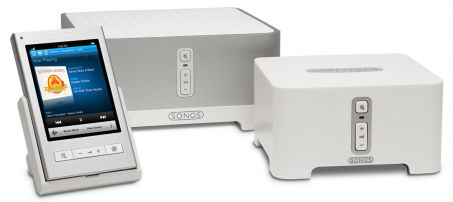
Thankfully, things are starting to change. And one area that’s finally starting to lose the plastic shackles is home audio. Cable-free sound specialists, Sonos, sent me a Music System to play with. Here’s how I got on.
The best thing about the Sonos Music System is just how easy it is to set up. Get it out the box, plug it into your router, plug the other bit into your stereo, and they all just get on with doing their job. My laptop noticed the Sonos’s existence straight away and decided to play nice, though my other half’s Mac required software to get it going.
That would be my only complaint: yet another bit of software that needs to be installed. Possibly, it’s my own fault for being a technology journalist who has to review lots of gadgets, but I’m sure others share my pain. The software will want to go through your iTunes library and convert file types to suit the Sonos.
That aside, the whole process is pretty painless. You can buy the bits your need, but a basic kit normally includes two Zone Players, speakers and the Controller. One Zone Player will need to be connected to the amp on your stereo (so you’ll need the right inputs on the back) and is also the master unit that connects to your router. If your router is in another room, you’ll also have to buy the Zone Bridge connector (around £80) to transmit the wireless signal. The second Zone Player includes an amp and connects up to the speakers.
The Controller isn’t vital if you have an iPhone or iPod Touch. An app will do the same job for you. It all works very well either way, and you’ll be able to hook up to all the computers on your wireless network with no trouble. You can control music in each zone, set up playlists and connect up to Last.FM.
In short, it’s a brilliant system, it looks nice and it’s pleasingly easy to use. But it’s also seriously pricey. And that could be its undoing. A Mac, and a couple of Airport Express units will do almost the same job for a fraction of the price. Sonos has been making these systems for a while and the price doesn’t seem to be going down all that much. You can expect to pay around £800 for the basic set up and if you want to add further zones, it’s going to cost you around £300. It’s a shame it’s not more affordable because I’d definitely be treating myself to one. Instead
Buy from Shop.com

Katie Lee
Dork Adore's Editor! Katie started out life as a tech journalist and blog obsessive, launching the UK's first and biggest blog publishing network, Shiny Media. Favourite dork things: knitting, crochet, Press Gang, Buffy, Battlestar, Doctor Who and lifehacks.
Follow Me:


 Preview: E4’s Misfits. Superheroes with ASBOs
 Hands on with Blue Microphone’s Mikey Digital for iProducts
 What it’s like to have laser eye surgery
 Union Jack gadget gubbins
 RSS
RSS
 Facebook
 Twitter
 Pinterest
To be fair, an Airport Express setup will do a similar job but far from exactly the same. Airport Express will play your iTunes downloads, a bit of internet radio, that’s it.
Sonos, on the other hand, will allow you to source music from popular music services like Napster, Rhapsody, Deezer and last.fm – these all offer “all you can eat” music for a fixed price. For a fiver a month I get to play any album from any artist on general release, something like 7 million tracks. This is one place where the true value of Sonos comes out.
Additionally, Sonos can play different music in different rooms…Airport Express is limited to one track at a time from each iTunes library. In our case, that’s Take That in the kitchen whilst I listen to Foo Fighters in the bedroom…all from the same system without reconfiguring.
I’m certainly not going to say it’s cheap, but it’s certainly excellent value for us and I’ve gone from an initial 2 zone trial up to 11 zones across 2 homes with the new portable Sonos S5 system on the way which can be used all over the house, garage, garden etc.
All fair points. I certainly could get attached to the Sonos. Possibly, if I didn’t already have things like an internet radio for the kitchen (so I can listen to podcasts etc), a sound system set up in the living room with iPod dock and a Mac set up in the bedroom, I would treat myself to one.
In fact, we’re moving into a proper grown up house soon and will definitely think long and hard about getting a system like this… but I can’t think of many times where we’ve wanted to listen to different music in different rooms. If at all.