 I started out my gadget career reviewing laptops for What Laptop magazine and while the specs may have changed beyond all recognition, knowing how to pick a good one is the same as it ever was.
Here are five simple rules to follow when choosing yourself a new notebook.
1. Look beyond the specs
Check out the latest top end processor, graphics cards and maximum RAM and memory. Bear those in mind when purchasing, but don’t be ruled by them. There’s a lot more to a laptop than its specs and going for the biggest “bang for buck” doesn’t necessarily make for a good purchase.
2. Read reviews
Laptops change regularly and if you want to be sure of getting a good one, you need to read the reviews. PC Pro and What Laptop take machines into their labs and run some serious benchmarking tests. Again, benchmarks aren’t the be-all and end-all, but they can be helpful if you’re stuck on your decision.
Consumer reviews are helpful too because they tend to pick up on things that techies may have missed. Plus, they are often based on long-term usage while professional reviews are done to a tight deadline.
3. Give it a good grope
If possible, you need to get your hands on a machine before you buy it. Here’s how you give it a good going over.
- Open the lid and check the hinges – do they feel secure and well-made?
- Press the middle of the lid and see how much the screen distorts and buckles. Ultraportables tend to be a bit more flimsy than desktop replacements, but if your chosen machine is allowing the screen to bend under slight pressure, imagine how it’s going to cope with being carried around.
- Press the keys on the keyboard firmly. Do all the keys around it move along with the key you’ve pressed? If so, it’s not a very good keyboard and won’t be much fun to to type on in the long term. You want keys that feel springy, but solid.
- Check the keyboard layout. It’s not enough just to tap the keys, you need to make sure that the return key, space bar and shift keys are all where you want it to be. If you use the Control key a lot, make sure you’re not constantly hitting the Function key.Little things like this are important. You’ll get used to certain changes in keyboard layout, but sometimes having a tiny backspace key that’s in the wrong place can seriously grate
- Check the ports. It’s not like the old days any more, when people wanted parallel ports, Type II serial bus connectors, 50 other ports: now all we’re really after is a plentiful supply of USB ports and a card reader. But you need to check a machine has what you need. Check the location too: common complaints include USB ports that are all on the wrong side for a mouse, or ports that are so close together you can’t use them.
4. Don’t buy for the name
I think there’s something to be said for brand loyality. If you find a company you trust, why shouldn’t you buy their products? But don’t buy something just because it’s made by your favourite brand. Not all machines are created equal, and don’t just assume that because it’s made by a big name, it’s going to be good.
5. Buy on looks
Possibly contentious, but if you’re paying a lot of money for something, why on earth shouldn’t you expect it to be be beautiful?
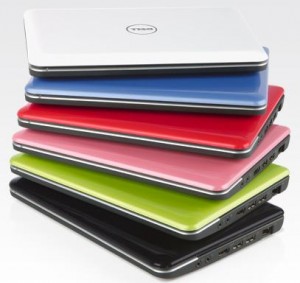
If you want a pretty laptop, buy yourself a pretty laptop! Yes, you could probably get a super-power, high spec, processing beast for the same price, but if it looks like something still hankering for the good old days of the Cold War, why would you want it in your life?
[Pic: Dell Mini 10 netbook]

Katie Lee
Dork Adore's Editor! Katie started out life as a tech journalist and blog obsessive, launching the UK's first and biggest blog publishing network, Shiny Media. Favourite dork things: knitting, crochet, Press Gang, Buffy, Battlestar, Doctor Who and lifehacks.
Follow Me:


 5 Stylish And Comfortable Laptop Tables
 Dork Review: Nokia Booklet 3G
 GHD hair straighteners – How to spot cheap fakes
 The best gadgets at CES 2010
 RSS
RSS
 Facebook
 Twitter
 Pinterest
Or save yourself a ton of bother and just buy a Macbook (pro) ?
I think I’m being serious.
I was going to save myself the bother and write that at the bottom of the feature, since I knew I’d get that comment! You have the honour of being the 2nd one (Will Head beat you to it on Twitter).
The problem is, every time someone else says it, I step further away from the cult of Mac. http://blogs.telegraph.co.uk/technology/katielee/100002162/what-puts-me-off-apple-apple-users/
I know, I know – even as I say it to people, I feel the urge to pull them to one side and administer a lifestyle stress test.
But I’ve always regarded myself as a fairly cynical techhead, I’ve been through a ton of different technologies, used and owned more laptops than I care to mention (currently 1 eee, 1 Asus windoze laptop, and a Macbook). And it’s not even close – the Macbook is the best laptop I’ve ever owned.
Yes, there are glitches – battery life isn’t great, the OS X UI is sucky for dual screen working, but still, it’s a joy to use. VMware / Bootcamp for the times I need Windows. *nix under the hood. What’s not to like (apart from smug owners like me ?)
I was shopping around for a new laptop at the same time as I started a contract in an office which entirely runs mac’s. someone suggested I wait til the end of my contract and I’d had 4 months of using one constantly to road-test it thoroughly. And after 4 months I still find the damn thing annoying. What drives me mad, is that the ‘home/end of line’ and ‘home/end of doc’ short cut keys change from programme to programme. This sort of inconsistency is the kind of thing I was under the impression mac’s Aren’t Meant To Do. grrrr.
More to the point, I am utterly in love with my laptop that I bought because it fulfilled a set of criteria that made me happy and no sense to anyone else. but they don’t have to use it.